Our Home Assistant dashboard had nine tabs: one per room, plus a few for energy, the weather and a map. Nobody ever got past the first one. I wanted a single page that shows what is going on in the house when you open it, with a quick way to jump to a room when you need a light switch.
I built this over an afternoon and an evening together with Claude. It wrote the YAML, a small custom card and a test setup; I tried every version on my phone and said what bothered me. A fair amount of what follows is about the things that did not work the first time.
One page with a menu at the bottom
The page uses Home Assistant’s sections view, with every room as its own section. The first idea was a row of room buttons that stayed at the top of the screen while you scrolled. On my phone that row kept landing on top of the badges. We went through three versions, and each one looked fine in the debug output and wrong on the phone, because we were changing code without ever seeing the page.
That changed once there was a way to look. A headless Chromium in one of my containers now logs in to Home Assistant, opens the dashboard at iPhone, iPad and desktop widths, clicks where it is told to, and saves screenshots and measurements. After that, most fixes were checked before I saw them.
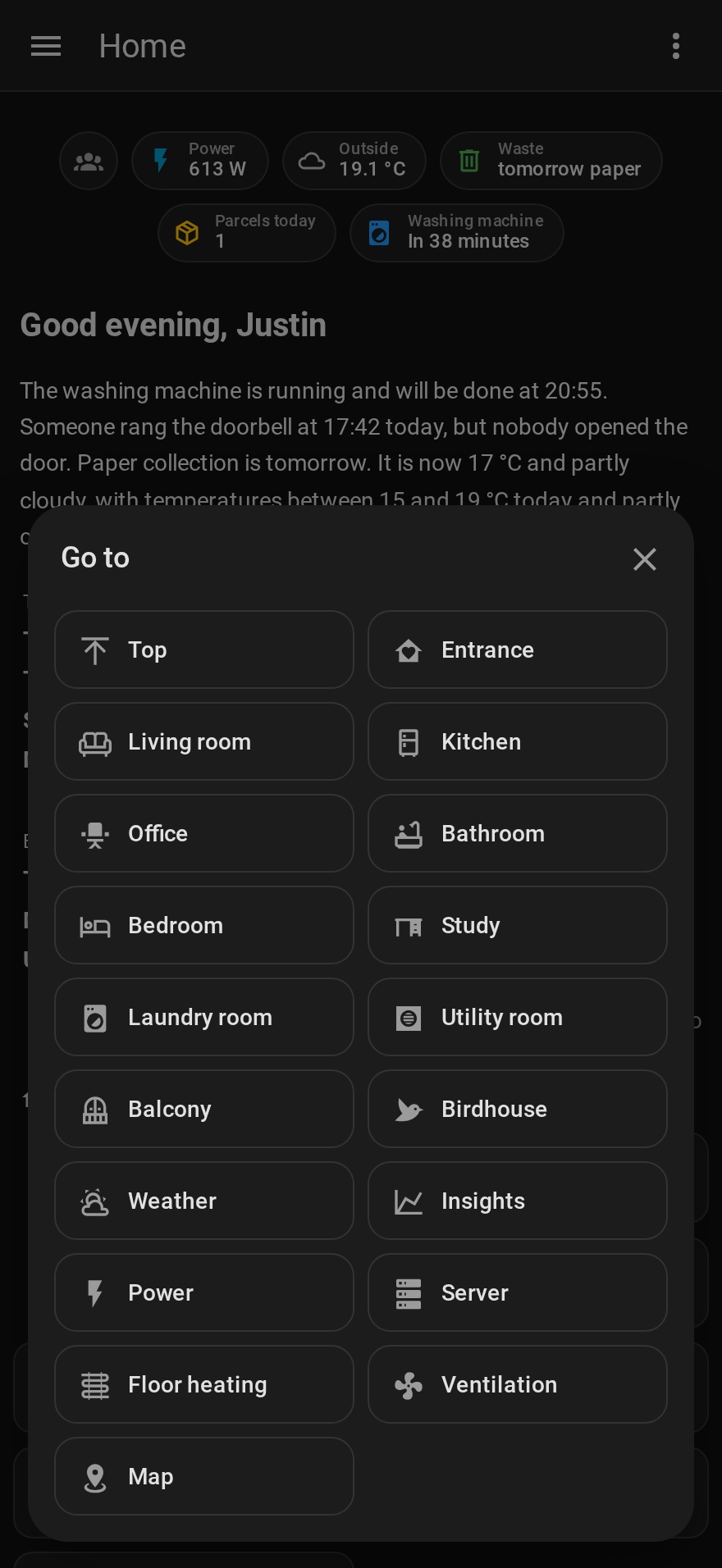
The floating row was dropped. What replaced it is a card in the view footer, which Home Assistant already keeps at the bottom of the screen. It is a single pill with a home button on the left and, on the right, the name of the section you are looking at. Tap that and a list of all sections opens. Sections that are hidden for a particular user are left out of their list as well.
Badges that only appear when they matter
Power use and the outside temperature are always there. The rest shows up when there is a reason: the front door when the lock is not locked, waste collection today or tomorrow, parcels arriving today, and the washing machine or dishwasher while a program runs (time left) or when it has finished (green).
Badge visibility rules can compare a state or a number, and they cannot look at attributes. The number of parcels arriving today only exists as an attribute of the parcel integration, so it got its own small template sensor. Waste collection got one too, which folds today and tomorrow into a single value. The power badge turns orange above 2000 W. A badge has one fixed colour, so that is two badges with opposite conditions.
A welcome text from a model in the house
Under the greeting sits a short text about the day. A script collects the family calendar, the weather forecast, the shared to-do list, the waste collection calendar, and anything in the house that needs attention: a water leak, a smoke alarm, high CO2, a balcony door left open, a battery running low, a washing machine that is done. It also looks for doorbell rings that nobody answered. All of that goes to Qwen3.6-35B-A3B on llama.cpp, running on the Arc Pro B70 I wrote about earlier. The text is refreshed six times a day, and also when the calendar or a parcel changes or someone comes home, at most once every ten minutes. None of it leaves the house.
Home Assistant already had a conversation agent pointed at the same model through LiteLLM, so that was the first thing I tried. That route has thinking switched on. For this job the model reasoned for 43 seconds, ran into the token limit after roughly 10,000 characters of thinking and returned no text at all. Putting /no_think in the prompt made no difference. Calling llama.cpp directly with thinking disabled in the chat template arguments gives an answer in one to two and a half seconds, and a rest_command in Home Assistant can send exactly that request:
rest_command:
  welcome_model:
    url: http://<model-server>:8000/v1/chat/completions
    method: POST
    content_type: application/json
    timeout: 60
    payload: >-
      {{ {"model": "hermes-local", "max_tokens": 700, "temperature": 0.3,
          "chat_template_kwargs": {"enable_thinking": false},
          "messages": [{"role": "system", "content": system},
                       {"role": "user", "content": "Data:\n" ~ data}]} | to_json }}
Getting it to say less
Without a reasoning step the model takes the data very literally, including the parts you did not mean as content. Nearly every fix ended up in the template that prepares the data, and very few in the prompt.
In the first version appointments went in as a plain list with times. An appointment from that morning was described as yesterday. Once the template sorted them into groups like “already happened”, “later today” and “tomorrow”, that stopped.
Empty sections were worse. A line saying there was nothing special in the house turned into an opening sentence saying there was nothing special in the house, every single time. A fixed numbered order of topics made it write a sentence for a topic that was missing. Now a section that has nothing in it is simply not in the data, and the prompt says to take the topics in the order they appear.
On a quiet day with only the weather to report, it started filling space. It told us who lives in the house and welcomed us to the dashboard. A rule against that in the prompt helped most of the way, and a regular expression now removes the few sentence patterns that still slip through.
It also said there were three appointments when the list had four. Telling it not to mention numbers did nothing; it kept saying three. Putting the correct count in the data fixed it. And a parcel name that had been shortened with an ellipsis came back in the text with the ellipsis still in it, so names are now cut at a sensible point without one.
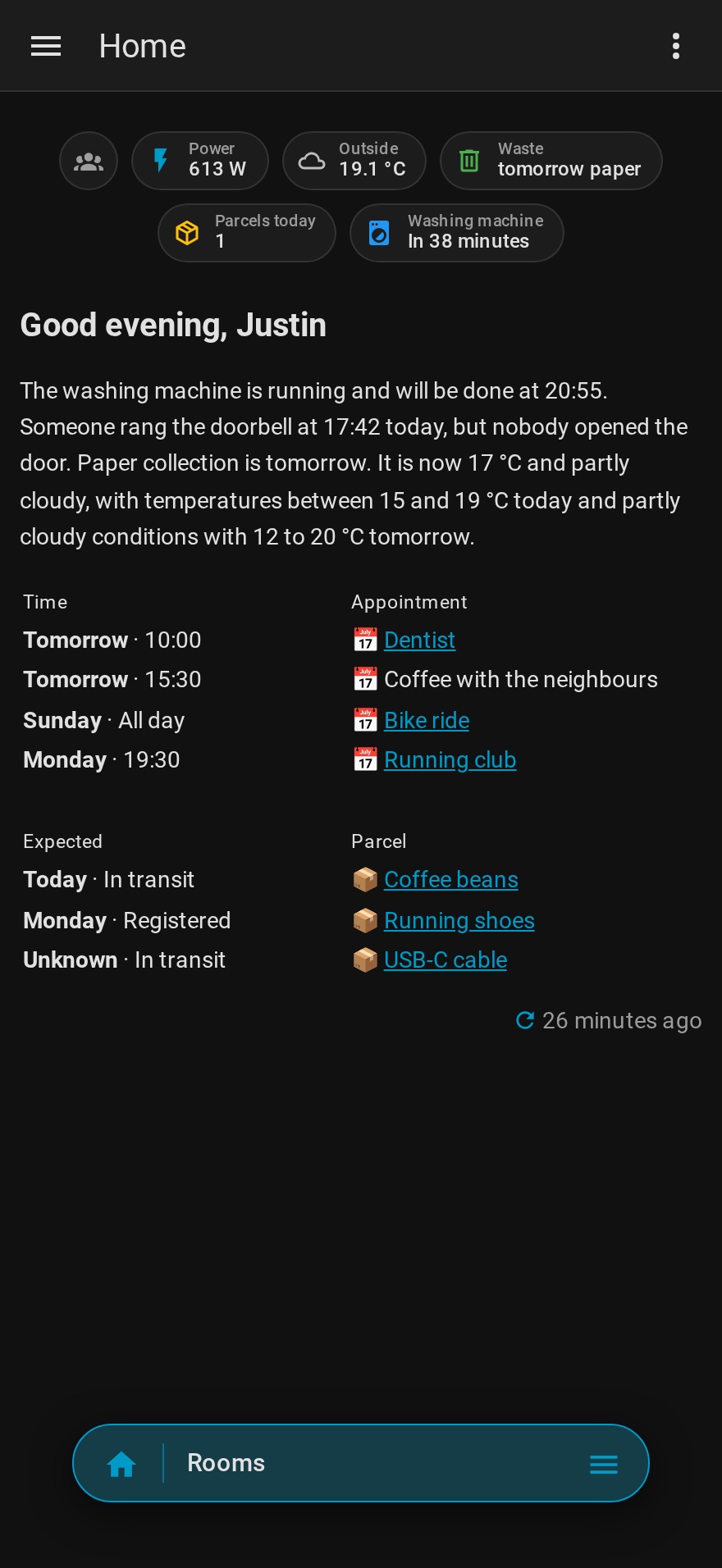
Later that evening I asked for a shorter text without the calendar and the parcels. Those now sit in a table under the text, produced by the template, and the model writes two to four sentences about the house, missed doorbell rings, the bins and the weather.
Doorbell rings nobody answered
When the doorbell camera detects a visitor, an automation waits up to ten minutes for the smart lock on the front door to report that it opened. If that does not happen, it records the time, and the next text mentions that someone rang and the door stayed closed.
There is a gap in this. Another automation already unlocks the door when someone rings while we are home. If you then pull the door open by hand, the lock never reports being opened, and the ring is counted as missed. A contact sensor on the door would close that gap. I do not have one yet.
One table without borders
Appointments and parcels sit in a table under the text. Markdown tables size their columns to the content, so two of them above each other never line up, and Home Assistant’s sanitizer lets a width attribute through on HTML tables but no style. The first version used a column group in pixels. That lined the tables up, with a border around every cell.
The markdown card turns out to recognise role="presentation" on a table and drops the cell borders and padding for it. I tried a line under each header after that. A horizontal rule brings 16 pixels of space above and below, and a thin border on an empty table inside a cell draws a double line, so the lines went. What is left is one table with small headers: the appointments, an empty row, then the parcels. The left column has the day in bold, followed by the time or the parcel’s status; the right column has a calendar or package emoji and the name. A parcel’s name links to the carrier’s tracking page, built from the carrier code and tracking number Parcel reports; the integration itself hands out no link. An appointment with a location in the calendar links to a Google Maps search for that place. Nothing further than three days ahead is shown, a delivered parcel stays until the end of the day it arrived, parcels the carrier cannot find are left out, and names are shortened so a row stays on one line on a phone.
The welcome text in the screenshots was written by the same model from made-up data, a doorbell ring, paper collection tomorrow and a washing machine that is still running. At home it writes in Dutch; for these screenshots it got the same instructions in English.